

If you’re on a Dedicated SaaS deployment, please reach out to your account team to enable macOS VMs.
How it works
macOS support is built on the same declarative configuration system as Linux. Theruns-on field in your blueprint tells Devin which platform to build and run on, and each platform gets its own snapshot.
The main differences from Linux are the shell, the file system layout, and the package manager:
Starting a macOS session
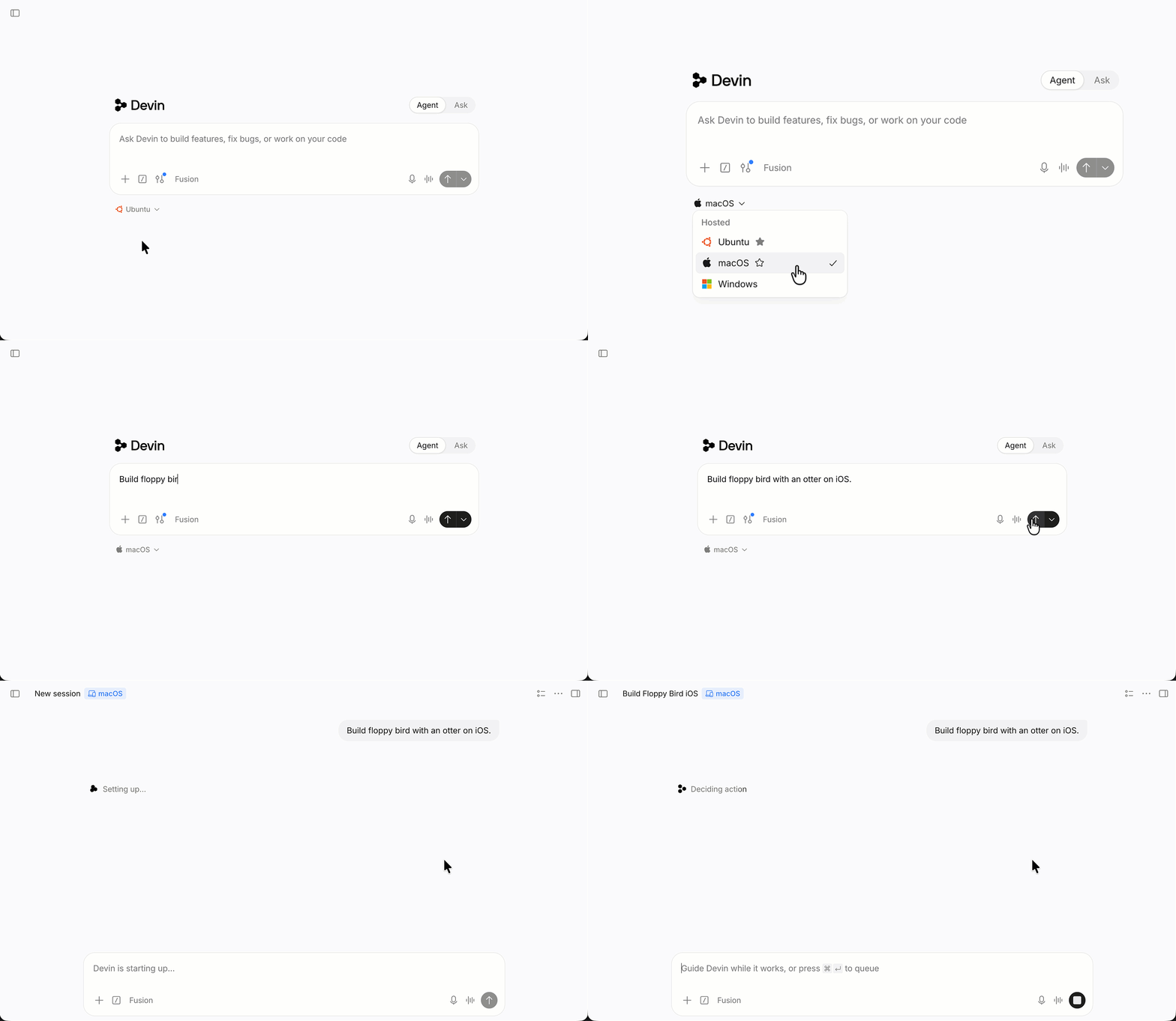
You can choose macOS per session:- Blueprint: add
runs-on: macosso the repo’s snapshot is built for macOS (see below). - Slack: use the
!macbang command to start a session on a macOS VM. - API: set
platform: "macos"when creating a session, schedule, or automation. See the API reference. - Organization default: an admin can make macOS the default for new sessions under Settings → Devin → Default platform, or with the Set Organization Default Platform API. Check the current value with Get Organization Default Platform.
Writing macOS blueprints
Single-platform blueprint
If your repository only targets Apple platforms, useruns-on: macos at the top level:
Multi-platform blueprint
To build the same repository for more than one platform, write each platform as a separate YAML document separated by---. Each document declares its own runs-on label. See the Multi-document YAML callout in the blueprint guide for background on this format.
The runs-on field
The runs-on field maps to a registered machine config on your account:
You can specify
runs-on as a string or a list:
Usage and cost
macOS sessions currently consume the same usage as equivalent Linux sessions, with no macOS surcharge.This is promotional launch pricing and is subject to change.
What’s preinstalled
macOS session images ship with the Apple toolchain already installed, so your blueprint doesn’t have to download it:
Versions move as Apple ships new releases and the image is refreshed. To see exactly what a session has, ask Devin to run:
Selecting an Xcode version
The default Xcode is the onexcode-select points at. To use another installed version for a single command, set DEVELOPER_DIR:
/usr/bin/xcodebuild (the shim that honors DEVELOPER_DIR) rather than a xcodebuild resolved from a specific Xcode’s Contents/Developer/usr/bin on PATH, which reports its own version regardless of DEVELOPER_DIR.
Or switch the default for the whole session:
macOS session behavior
Local account
Sessions run as thedevin user, an admin account with password devin and passwordless sudo. macOS asks for this password when an app is granted a permission in System Settings → Privacy & Security (Accessibility, Screen Recording, Automation); enter devin. The password works only for these GUI prompts: SSH password login is disabled on macOS VMs.
Shell
macOS sessions use zsh as the default shell. Most POSIX shell commands work unchanged from Linux blueprints, but note the BSD userland:sed -i requires an argument (sed -i ''), and GNU tools like gsed, gdate, and greadlink come from the Homebrew coreutils formula.
Paths
/Users/devin/repos/<repo-name>, and files you upload to a session are written to /Users/devin/.files/.
Secrets
Secrets are available as environment variables during sessions ($SECRET_NAME), same as on Linux. This is how to supply App Store Connect API keys, signing credentials, or private registry tokens:
Session sleep and wake
Sessions snapshot to disk when they sleep. Everything on disk survives a wake: installed tools, cloned repos, build caches, derived data. Running processes do not: dev servers, simulators, and watchers need to be restarted after the session wakes up.Computer Use
Computer Use works on macOS sessions: Devin gets a full macOS desktop with Chrome, mouse, and keyboard, and can test macOS-native apps as well as web apps, and record what it does. Devin uses the Command key for macOS shortcuts (⌘C, ⌘V, ⌘Tab) rather than Control.iOS Simulator
Devin can boot and drive the iOS Simulator directly:Tips & Tricks
Warm build caches
A cold Xcode build results in a suboptimal developer experience, with longer build time. Use themaintenance field in environment.yml to prewarm the cache.
Network access
Builds that fetch from CocoaPods, Swift Package Manager, Firebase, or a private registry need those hosts reachable. If your organization runs with a restricted network policy, make sure the macOS allowlist covers the same registries your Linux builds use. The two are configured separately, and a missing entry usually shows up as a dependency-resolution or TLS failure in the middle of a build.Running containers
macOS VMs have no nested hardware virtualization, so a container runtime has to fall back to QEMU’s software emulation (TCG). Colima detects this and switches to emulation on its own:colima start if it fails. Containers then run roughly 15 to 25x slower on CPU than native, with a few seconds of startup each; pulls run at host network speed. That’s fine for a linting or packaging container, painful for compiling. For container-heavy work, use a Linux session or point the macOS session at a remote Docker daemon.
Don’t install Xcode in a blueprint unless you have to
Xcode is a multi-gigabyte download, and Apple gates it behind an Apple ID. Prefer the versions already in the image, selected withDEVELOPER_DIR or xcode-select. If you need a different release or beta, you can store an Apple ID as a secret and have the blueprint download that version, at the cost of a much slower build.
Limitations
Troubleshooting
Builds are much slower in the first session after a snapshot rebuild. DerivedData was rebuilt from scratch. Add abuild-for-testing step to maintenance so the snapshot carries a warm build.
xcodebuild picks the wrong toolchain. Check xcode-select -p, and set DEVELOPER_DIR explicitly in the blueprint step.
A destination isn’t found. Run xcrun simctl list devices available to see what the installed runtimes actually provide, and match the -destination name and OS to it.
Dependency resolution hangs or fails with a TLS error. The host is likely missing from your organization’s network allowlist for macOS. See Network access.