

Permission rules
- Deny rules block actions entirely (highest priority)
- Ask rules always prompt for approval
- Allow rules auto-approve actions without prompting
Read(**/*.pem)) match against every workspace directory in the session, including directories added after it started.
The mode decides how much the agent asks for actions that no rule covers.
Responding to permission requests
When the agent asks for approval, the request card offers a few ways to answer:- Edit the command — click the command in the card to change it before approving. The wand action lets you describe the change you want in plain language and has a fast model rewrite the command for you to review.
- Keyboard shortcuts — approve, always-allow, or reject a request without reaching for the mouse. The shortcut hints are shown on the buttons and dropdown entries.
- Session-wide grants — an approval you grant for the session applies to every later request in that session, so the root agent and its subagents don’t re-prompt for a scope you already granted.
MCP permissions
By default, the Devin Local agent prompts for approval before calling any MCP tool. When the agent wants to invoke an MCP tool, you can allow the specific tool or every tool on that MCP server, either for the current session or permanently.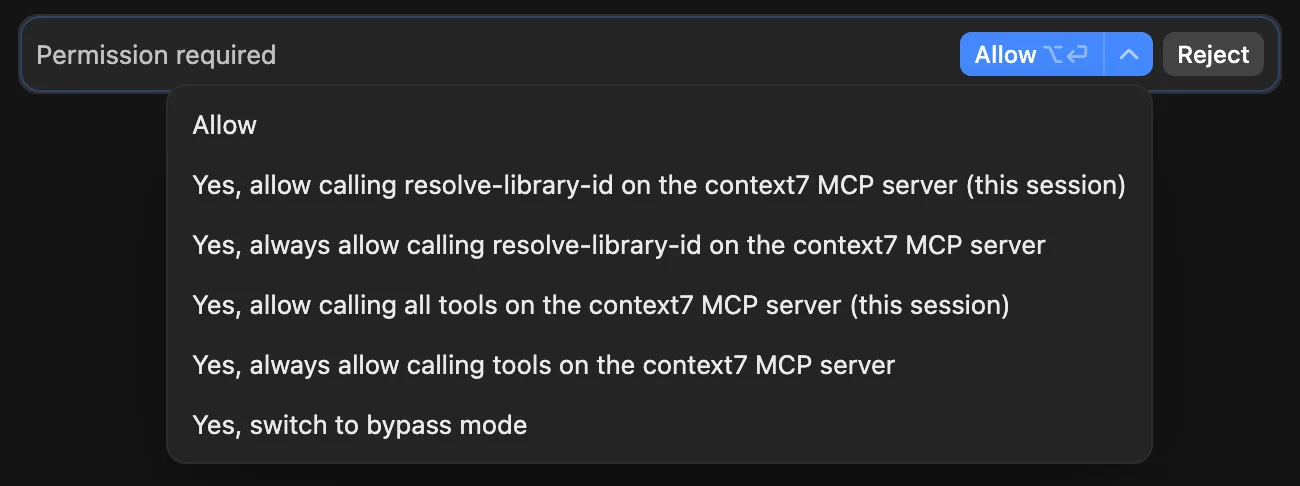
Sandboxing
With sandboxing enabled, the sandbox derives the writable paths from your permission scopes, andRead(...) deny rules hide paths from sandboxed commands.