

- Sessions to run inside your network, next to internal services, registries, and secrets
- Custom hardware profiles (e.g. GPUs, large memory machines, specific OS images)
- Existing dev box, VM, or Kubernetes infrastructure to host Devin workloads
- Enterprise controls over network access, build outputs, and monitoring
How it works
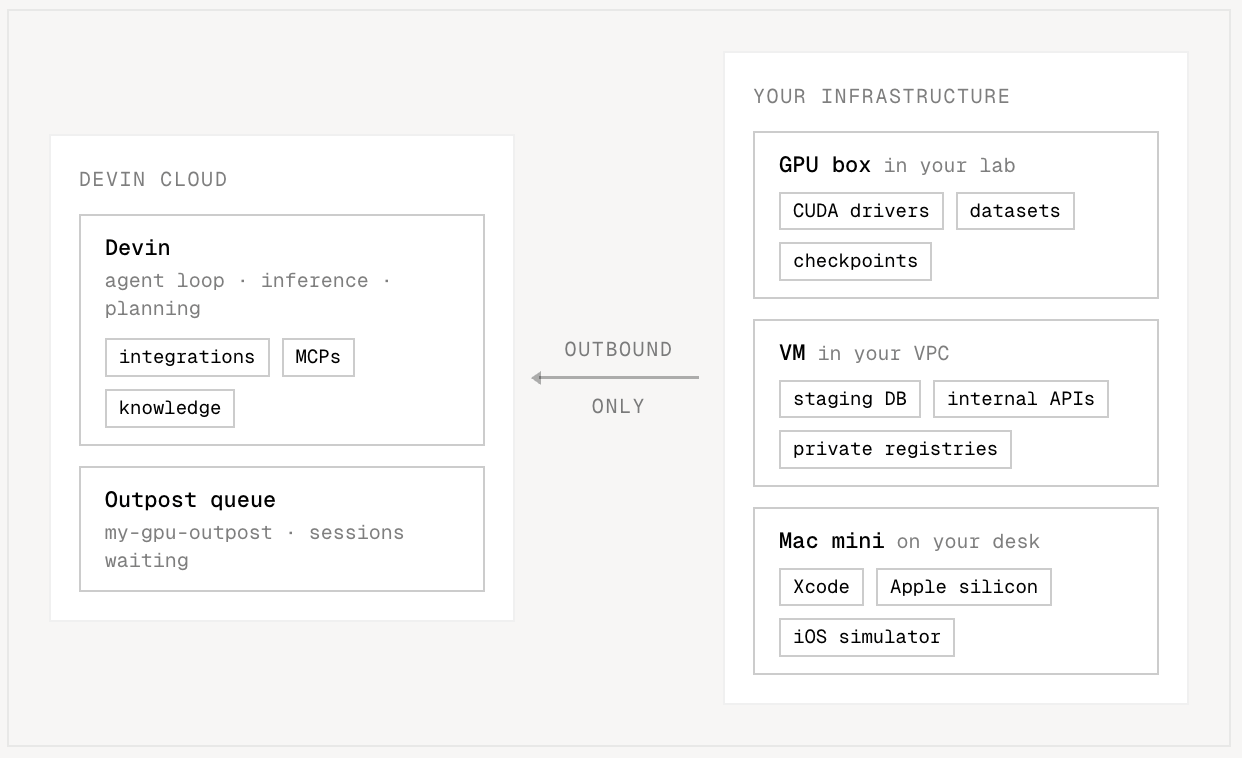
An outpost is a named queue of Devin sessions to be served on your own machines. Once you register an outpost (e.g.gpu-h200 or dev-boxes), it appears as a machine option in Devin Cloud alongside Ubuntu, Windows, etc. — Cloud sessions started on an outpost wait in its queue until one of your machines picks them up.
Every machine that serves sessions from an outpost is a worker. To turn a machine into a worker, install the Devin CLI and run:
Starting sessions on an outpost
Pick the outpost under Configuration → Virtual environment when starting a session in Devin Cloud (see the Quickstart), or from Slack with the!outpost bang command:
!outpost <name> accepts the outpost’s exact name, a unique prefix of it (!outpost gpu when gpu-h200 is the only match), or its ID. Send !outpost on its own to get the list of outposts you can use.
To run new sessions on a shared outpost by default, an admin can make it the organization default under Settings → Devin → Default platform, or with the Set Organization Default Platform API. Get Organization Default Platform returns the current default.
Orchestration
Long-lived worker machines are the simplest setup, but with the Outposts API you can also write an orchestrator: software that watches the outpost’s queue and, for each waiting session, spins up a fresh VM or container, starts the worker inside it, and tears the machine down when the session ends. See Orchestration to learn how, deploy devin-outpost-k8s — our open-source operator that runs the loop on any Kubernetes cluster — or run on a partner platform that already implements it for you (see Integrations).Machine dependencies
Sessions execute directly on your machines, so the worker relies on tools you install there.Get started
Quickstart
Create an outpost and serve sessions from a single machine with
devin worker start — no orchestrator required.Orchestration
Scale to a fleet: poll the queue, claim sessions, provision machines, and run workers automatically.
Reference
The full surface area: CLI commands and flags, fleet API endpoints, binary distribution, and the spawn contract.
Integrations
Partner platforms implement the orchestration loop for you — sessions run on their infrastructure with no worker to run and no orchestrator to build. Each partner documents its own setup:| Platform | What you get | Docs |
|---|---|---|
 Namespace Namespace | First-class macOS environments on Apple silicon — with computer use, Devin builds, runs, and tests iOS apps end to end | Devin Outposts on Namespace |
 Modal Modal | The same infrastructure you train and serve models on — reproduce failures and profile fixes on production hardware, scaling back to zero | Devin Outposts on Modal |
 OpenShell OpenShell | A sandbox for every session via the OpenShell runtime — from a single VM to a GPU cluster, built for secure and government environments | Devin Outposts on NVIDIA OpenShell |
| Brev | GPU instances on NVIDIA Brev, deployed as a one-click Launchable | Devin Outposts on NVIDIA Brev |
 Daytona Daytona | Linux and Windows sandboxes that start in under 90 ms from snapshots — repos, dependencies, and toolchains already in place | Devin Outposts on Daytona |
 E2B E2B | Agent machines at any CPU/RAM configuration with sub-second starts — including access to your private cloud | Devin Outposts on E2B |
 Cloudflare Cloudflare | An isolated sandbox per session, with traffic flowing through customizable proxies and private connectivity to internal services — no VPN or public exposure | Devin Outposts on Cloudflare |
Limitations
- Devin Outposts is available on all Pro, Max, and Teams accounts.
- Devin Outposts is also available on Dedicated Tenant deployments but is off by default, since a few Devin features behave differently when agents run on customer-managed infrastructure. Your account team can go over the details and enable it.
- Outposts shifts significant infrastructure and operational responsibility to the customer. Teams must secure and operate their remote development VMs at scale, including provisioning, isolation, access controls, capacity management, monitoring, and recovery. For security-conscious customers, we recommend Dedicated Tenant (Dedicated SaaS), which provides a customer-isolated environment with security and orchestration managed by Cognition.