> ## Documentation Index
> Fetch the complete documentation index at: https://docs.devinenterprise.com/llms.txt
> Use this file to discover all available pages before exploring further.
# Éliminez vos backlogs d’ingénierie
> Laissez Devin s’occuper de vos backlogs d’ingénierie
export const PromptBlock = ({children, type, agent, intent, playbookId}) => {
var utm = 'utm_source=docs&utm_medium=use-case-gallery&utm_campaign=prompt-block';
var tag = 'docs-use-case-gallery';
var agentParams = (agent ? '&agent=' + agent : '') + (intent ? '&intent=' + intent : '') + (playbookId ? '&playbookId=' + playbookId : '');
var label = type === 'schedule' ? 'Schedule in Devin' : type === 'playbook' ? 'Create Playbook' : type === 'knowledge' ? 'Add to Knowledge' : agent === 'advanced' ? 'Try in Devin' : agent === 'dana' ? 'Try in Dana' : agent === 'ada' ? 'Try in Ask Devin' : 'Try in Devin';
var buildUrl = function (text) {
var encoded = encodeURIComponent(text);
if (type === 'schedule') return 'https://app.devin.ai/settings/schedules/create?' + utm + agentParams + '&prompt=' + encoded;
if (type === 'playbook') return 'https://app.devin.ai/settings/playbooks/create?' + utm + '&body=' + encoded;
if (type === 'knowledge') return 'https://app.devin.ai/knowledge?' + utm + '&body=' + encoded;
if (agent === 'ada') return 'https://app.devin.ai/search?' + utm + '&noSubmit=true&prompt=' + encoded;
return 'https://app.devin.ai/?tags=' + tag + '&' + utm + agentParams + '&prompt=' + encoded;
};
const ref = React.useRef(null);
const [href, setHref] = React.useState('#');
React.useEffect(() => {
if (!ref.current) return;
var codeEl = ref.current.querySelector('pre code');
if (codeEl) {
var text = codeEl.textContent.trim();
if (text) setHref(buildUrl(text));
}
var header = ref.current.querySelector('[data-component-part="code-block-header"]');
if (header && !header.querySelector('.prompt-block-devin-link')) {
var link = document.createElement('a');
link.href = href;
link.target = '_blank';
link.rel = 'noopener noreferrer';
link.className = 'prompt-block-devin-link';
link.style.cssText = 'display:inline-flex;align-items:center;gap:6px;text-decoration:none;color:#fff;font-size:11px;font-weight:500;padding:4px 10px;border-radius:6px;white-space:nowrap;background:#317CFF;transition:background 0.2s;margin-left:8px;';
link.innerHTML = ' ' + label;
link.onmouseenter = function () {
link.style.background = '#2968D9';
};
link.onmouseleave = function () {
link.style.background = '#317CFF';
};
header.appendChild(link);
}
var existingLink = ref.current.querySelector('.prompt-block-devin-link');
if (existingLink && href !== '#') existingLink.href = href;
});
return
{children}
;
};
## Vue d’ensemble
Devin peut vous aider à gérer et organiser vos backlogs de tickets sur des plateformes comme GitHub, Jira et Linear, en automatisant les tâches fastidieuses de maintenance des backlogs tout en aidant votre équipe à se concentrer sur le travail le plus important.
## Scénarios courants de gestion du backlog
Mentionnez Devin dans un ticket GitHub pour lancer une nouvelle session Devin.
### Configuration
1. Poussez le fichier [devin-on-label.yml](https://github.com/ankehao-demo/COBOL-Demo/blob/main/.github/workflows/devin-on-label.yml) vers n'importe quel dépôt GitHub, dans un dossier `.github/workflows`
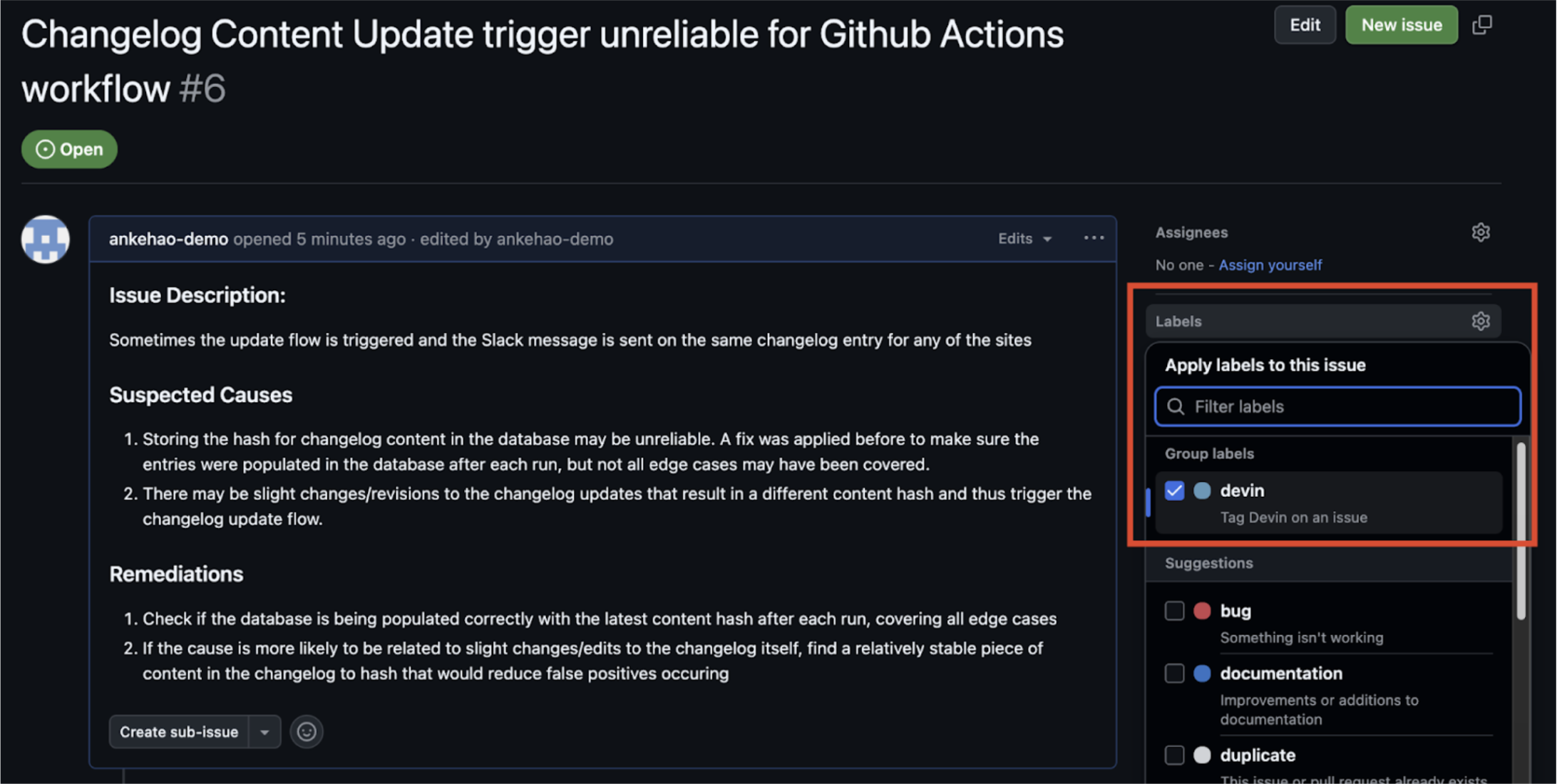
2. Créez un libellé d’issue GitHub nommé **`devin`**
3. Ajoutez la clé d’API Devin de votre organisation Devin comme secret du dépôt GitHub nommé `DEVIN_API_KEY`
### Fonctionnement
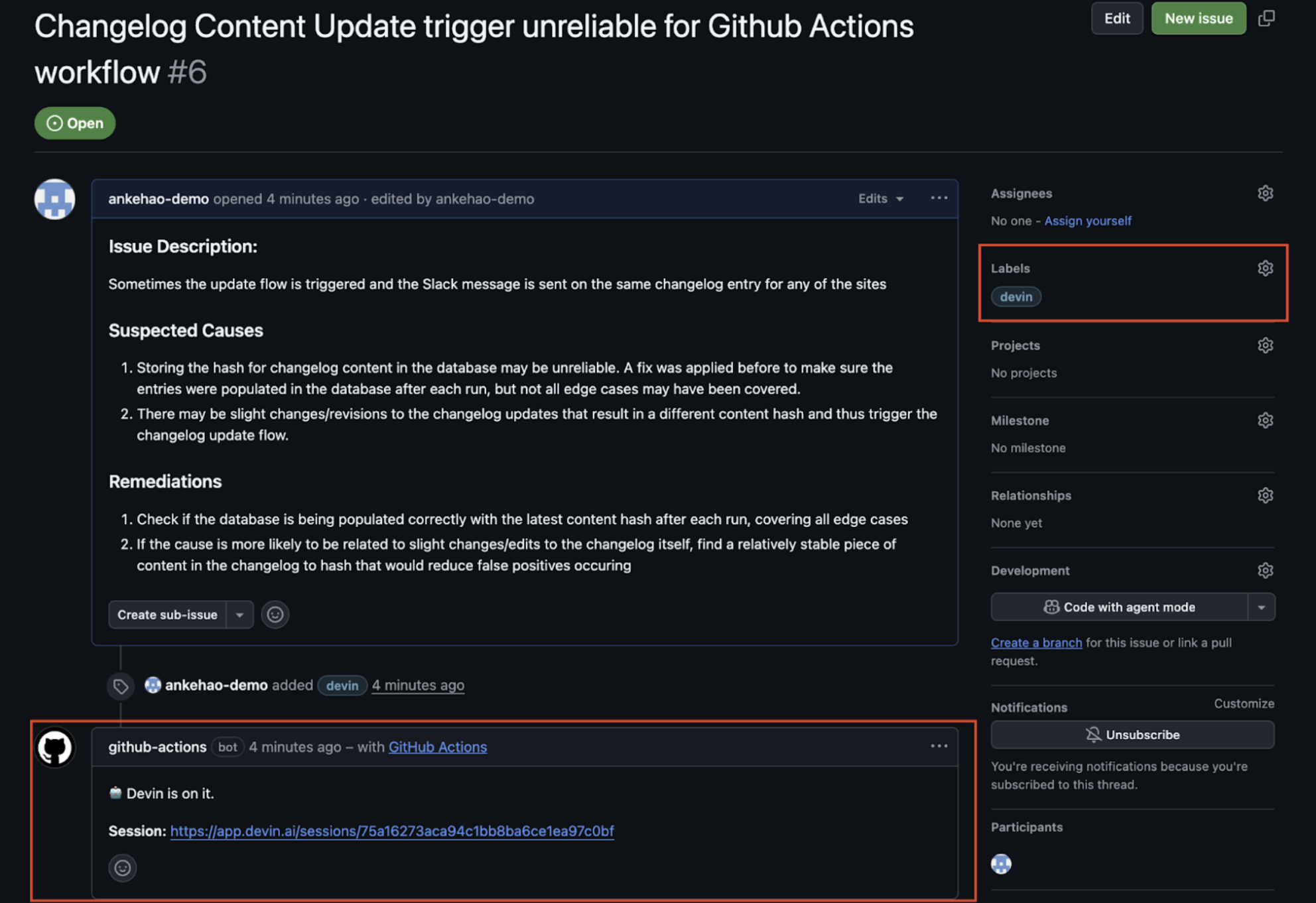
1. Ajoutez le libellé **`devin`** à un ticket
2. Le workflow GitHub Actions se déclenche et un commentaire automatisé est créé sous le ticket avec un lien vers la nouvelle session Devin
3. La session Devin est lancée automatiquement
### Intégrations Jira et Linear
Devin s’intègre directement à Jira et Linear pour vous aider à gérer votre backlog de tickets. Vous pouvez assigner des tickets à Devin sur les deux plateformes et les transformer automatiquement en PR.
Pour des instructions de configuration détaillées et les options de paramétrage, consultez le [guide d’intégration Jira](/fr/integrations/jira) et le [guide d’intégration Linear](/fr/integrations/linear).
## Cas d'utilisation connexes
* [Tests et refactorisation](/fr/use-cases/testing-refactoring)
* [Migration et modernisation](/fr/use-cases/migration-modernization)
 2. Le workflow GitHub Actions se déclenche et un commentaire automatisé est créé sous le ticket avec un lien vers la nouvelle session Devin
3. La session Devin est lancée automatiquement
2. Le workflow GitHub Actions se déclenche et un commentaire automatisé est créé sous le ticket avec un lien vers la nouvelle session Devin
3. La session Devin est lancée automatiquement