> ## Documentation Index
> Fetch the complete documentation index at: https://docs.devinenterprise.com/llms.txt
> Use this file to discover all available pages before exploring further.
# Despeja los backlogs de ingeniería
> Deja que Devin se encargue de tus backlogs de ingeniería
export const PromptBlock = ({children, type, agent, intent, playbookId}) => {
var utm = 'utm_source=docs&utm_medium=use-case-gallery&utm_campaign=prompt-block';
var tag = 'docs-use-case-gallery';
var agentParams = (agent ? '&agent=' + agent : '') + (intent ? '&intent=' + intent : '') + (playbookId ? '&playbookId=' + playbookId : '');
var label = type === 'schedule' ? 'Schedule in Devin' : type === 'playbook' ? 'Create Playbook' : type === 'knowledge' ? 'Add to Knowledge' : agent === 'advanced' ? 'Try in Devin' : agent === 'dana' ? 'Try in Dana' : agent === 'ada' ? 'Try in Ask Devin' : 'Try in Devin';
var buildUrl = function (text) {
var encoded = encodeURIComponent(text);
if (type === 'schedule') return 'https://app.devin.ai/settings/schedules/create?' + utm + agentParams + '&prompt=' + encoded;
if (type === 'playbook') return 'https://app.devin.ai/settings/playbooks/create?' + utm + '&body=' + encoded;
if (type === 'knowledge') return 'https://app.devin.ai/knowledge?' + utm + '&body=' + encoded;
if (agent === 'ada') return 'https://app.devin.ai/search?' + utm + '&noSubmit=true&prompt=' + encoded;
return 'https://app.devin.ai/?tags=' + tag + '&' + utm + agentParams + '&prompt=' + encoded;
};
const ref = React.useRef(null);
const [href, setHref] = React.useState('#');
React.useEffect(() => {
if (!ref.current) return;
var codeEl = ref.current.querySelector('pre code');
if (codeEl) {
var text = codeEl.textContent.trim();
if (text) setHref(buildUrl(text));
}
var header = ref.current.querySelector('[data-component-part="code-block-header"]');
if (header && !header.querySelector('.prompt-block-devin-link')) {
var link = document.createElement('a');
link.href = href;
link.target = '_blank';
link.rel = 'noopener noreferrer';
link.className = 'prompt-block-devin-link';
link.style.cssText = 'display:inline-flex;align-items:center;gap:6px;text-decoration:none;color:#fff;font-size:11px;font-weight:500;padding:4px 10px;border-radius:6px;white-space:nowrap;background:#317CFF;transition:background 0.2s;margin-left:8px;';
link.innerHTML = ' ' + label;
link.onmouseenter = function () {
link.style.background = '#2968D9';
};
link.onmouseleave = function () {
link.style.background = '#317CFF';
};
header.appendChild(link);
}
var existingLink = ref.current.querySelector('.prompt-block-devin-link');
if (existingLink && href !== '#') existingLink.href = href;
});
return
{children}
;
};
## Descripción general
Devin puede ayudarte a gestionar y organizar los backlogs de incidencias en plataformas como GitHub, Jira y Linear, automatizando las partes tediosas del mantenimiento del backlog y garantizando que tu equipo se concentre en el trabajo más importante.
## Escenarios comunes de gestión del backlog
Etiqueta a Devin en un issue de GitHub para iniciar una nueva sesión de Devin.
### Cómo configurarlo
1. Realiza un push de [devin-on-label.yml](https://github.com/ankehao-demo/COBOL-Demo/blob/main/.github/workflows/devin-on-label.yml) a cualquier repositorio de GitHub dentro de una carpeta `.github/workflows`
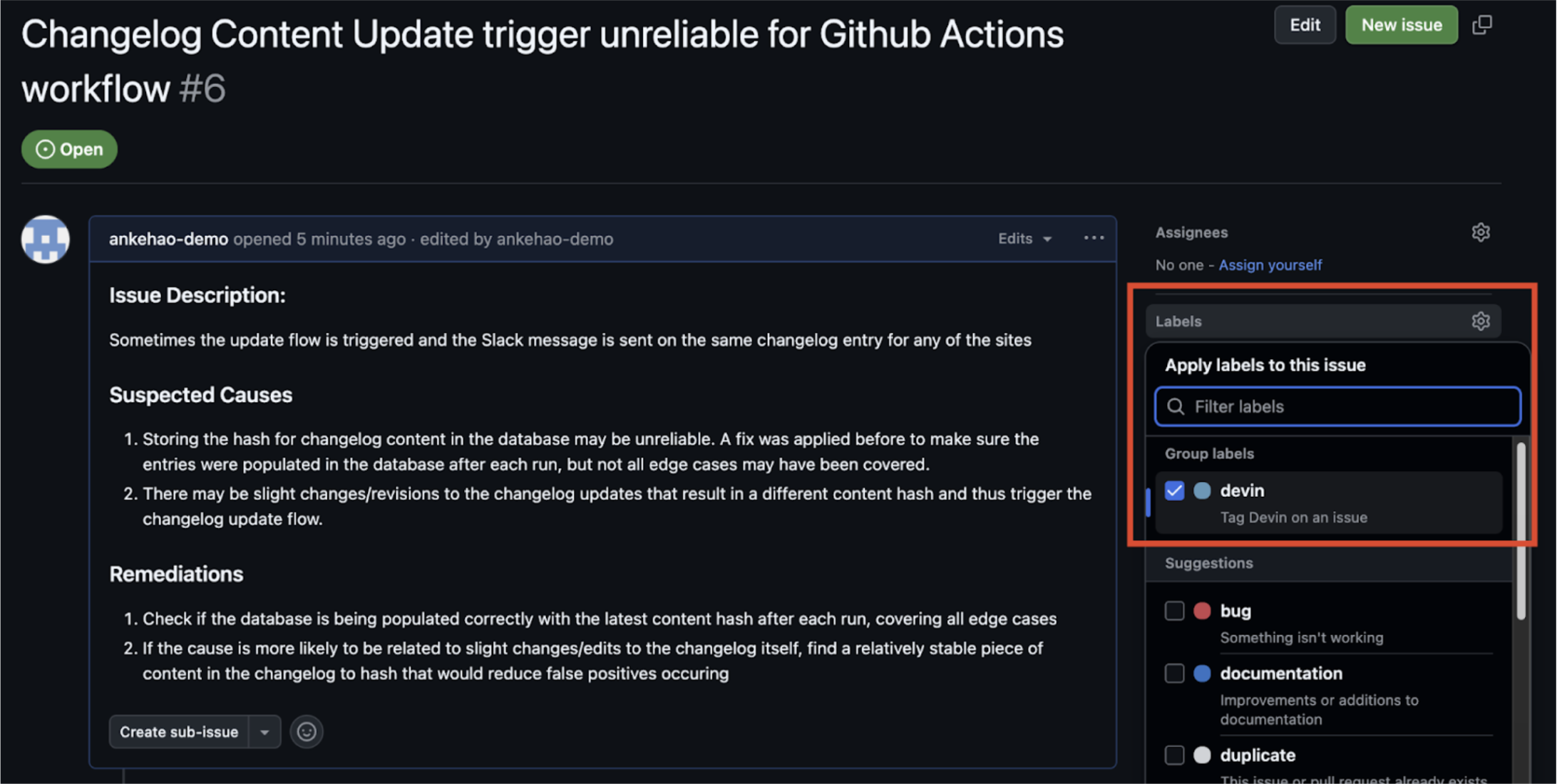
2. Crea una etiqueta de GitHub Issue llamada **`devin`**
3. Agrega la clave de API de Devin de tu organización de Devin como un secreto del repositorio de GitHub llamado `DEVIN_API_KEY`
### Cómo funciona
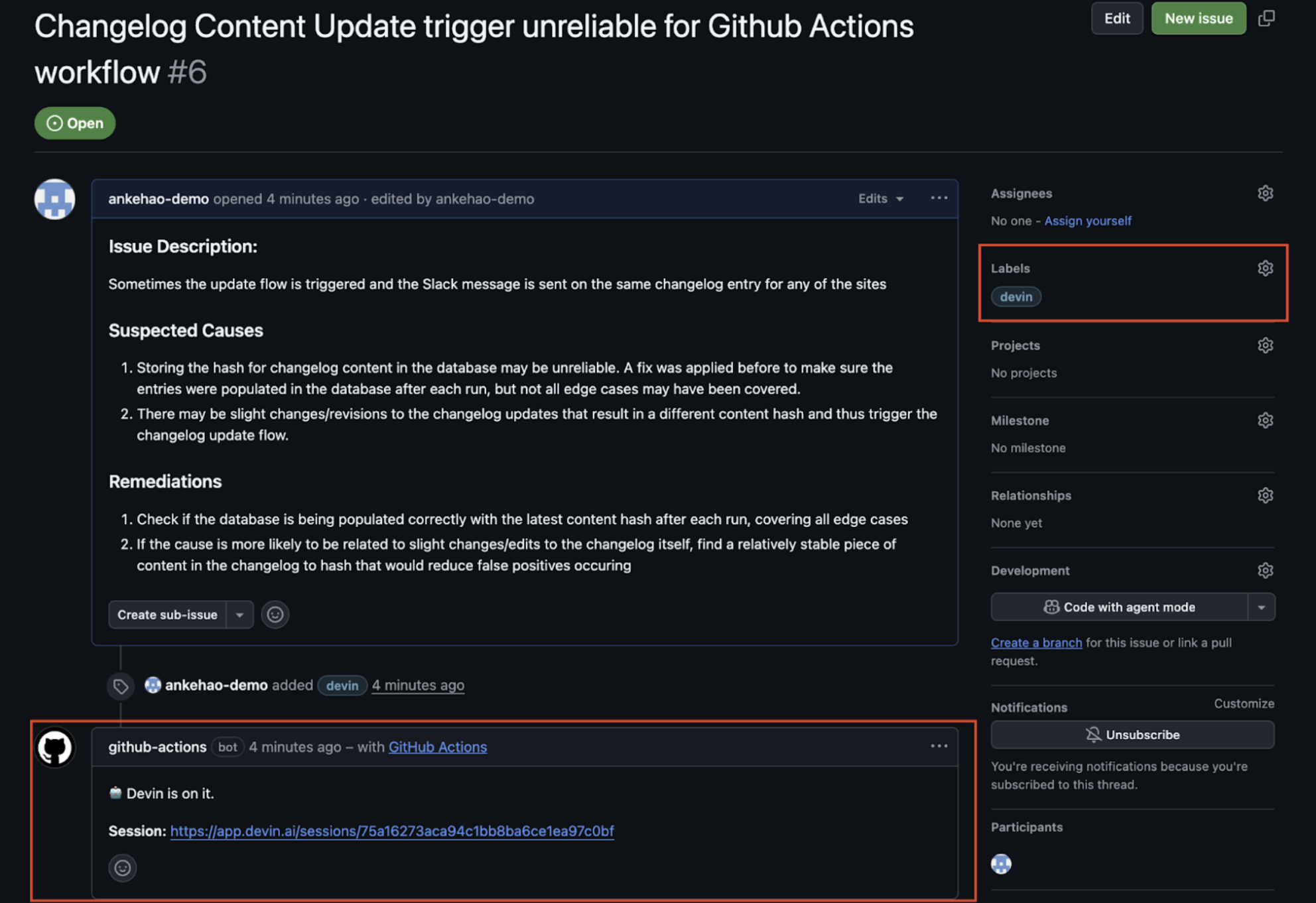
1. Agrega la etiqueta **`devin`** a un issue
2. El flujo de trabajo de GitHub Actions se ejecuta y se crea un comentario automático en el issue con un enlace a la nueva sesión de Devin
3. La sesión de Devin se inicia automáticamente
### Integraciones con Jira y Linear
Devin se integra directamente con Jira y Linear para ayudarte a gestionar tu backlog de issues. Puedes asignar tickets a Devin en ambas plataformas y hacer que se conviertan automáticamente en PRs.
Para obtener instrucciones detalladas de configuración y opciones de personalización, consulta la [Guía de integración con Jira](/es/integrations/jira) y la [Guía de integración con Linear](/es/integrations/linear).
## Casos de uso relacionados
* [Pruebas y refactorización](/es/use-cases/testing-refactoring)
* [Migración y modernización](/es/use-cases/migration-modernization)
 2. El flujo de trabajo de GitHub Actions se ejecuta y se crea un comentario automático en el issue con un enlace a la nueva sesión de Devin
3. La sesión de Devin se inicia automáticamente
2. El flujo de trabajo de GitHub Actions se ejecuta y se crea un comentario automático en el issue con un enlace a la nueva sesión de Devin
3. La sesión de Devin se inicia automáticamente