> ## Documentation Index
> Fetch the complete documentation index at: https://docs.devinenterprise.com/llms.txt
> Use this file to discover all available pages before exploring further.
# Azure DevOps (Service Principal)
> Connect Devin to Azure DevOps using a Microsoft Entra service principal
## Overview
Devin connects to Azure DevOps through a Microsoft Entra service principal. Your admin approves the Cognition-published **Cognition Azure DevOps Service Principal** application in your tenant, which creates a service principal that you then add to your Azure DevOps organization with the permissions you choose.
* Only `User.Read` is requested during Entra approval — this establishes identity only
* Entra approval alone does **not** grant access to repositories or code
* All repository access is controlled by permissions you assign in Azure DevOps
Unlike some other SCM integrations, Azure DevOps does not display third-party apps in the same way. All connection management is handled inside Devin under **Settings > Enterprise Settings > Integrations**.
## Prerequisites
Before setting up the Azure DevOps integration, ensure you have:
1. **Enterprise Devin account** with permission to manage integrations
2. **Microsoft Entra admin** who can grant admin consent for applications
3. **Azure DevOps organization admin** who can add users and assign permissions
## Setting Up the Integration
1. Sign into your Devin account at [app.devin.ai](https://app.devin.ai).
2. In a separate browser or incognito window, sign into Azure DevOps (needed for step 6).
3. In your Enterprise Devin account, navigate to **Settings > Enterprise Settings > Integrations** and select **Azure DevOps**.
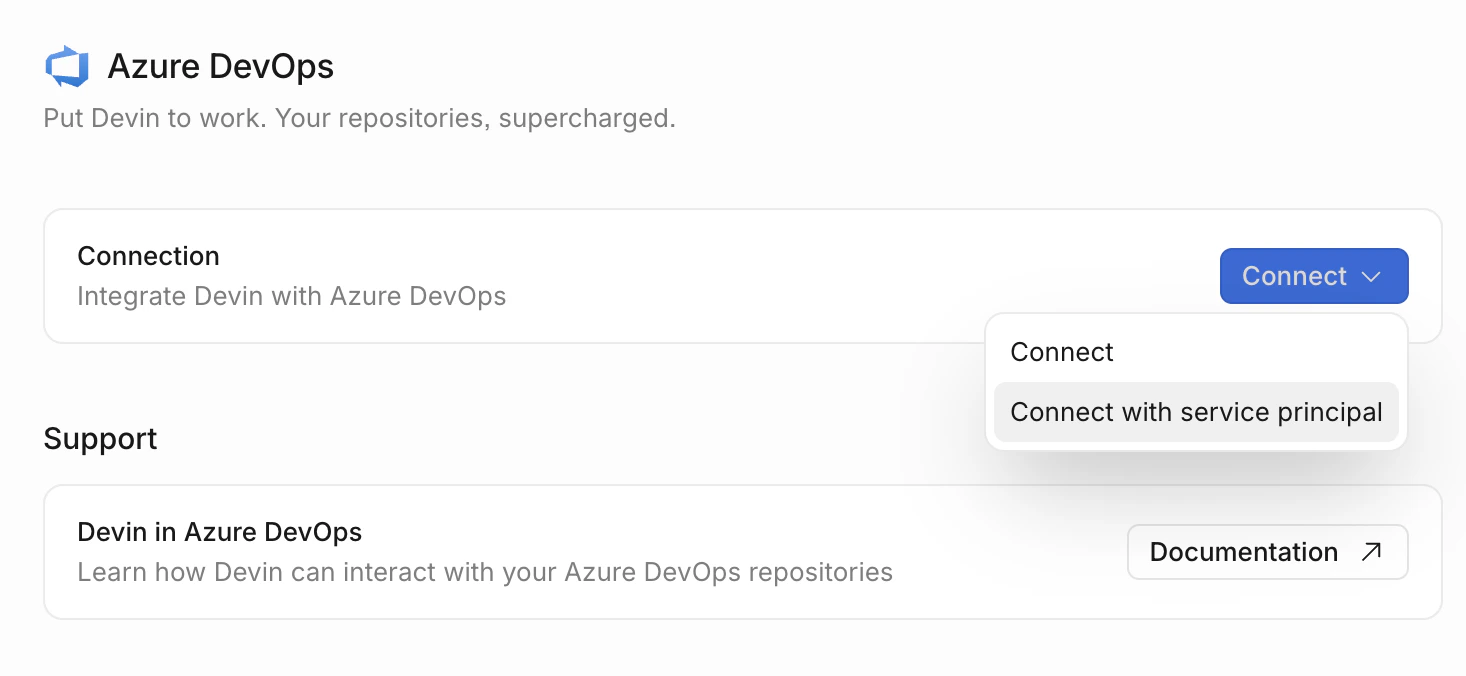
4. Open the dropdown on the **Connect** button and select **Connect with service principal**.
 5. You are redirected to Microsoft to grant Devin permission to your tenant. After approving, you are returned to the Azure DevOps integration page in Devin, which now shows an **Add organization with service principal** section.
* Approving creates a service principal in your Microsoft Entra tenant
* This step only requests `User.Read` — it does not grant access to repositories
6. In Azure DevOps, navigate to **Organization Settings > Users**:
* Click **Add Users** and add the service principal (`Cognition Azure DevOps Service Principal`)
* Select **Basic** for the Access level (Stakeholder is not sufficient — APIs require Basic)
* Add to all projects you want Devin to have access to
* Assign the service principal to the relevant Azure DevOps Groups (typically Project Contributors)
7. Back in Devin, in the **Add organization with service principal** section of the Azure DevOps integration page, enter the Azure DevOps organization name from the previous step and click **Add**.
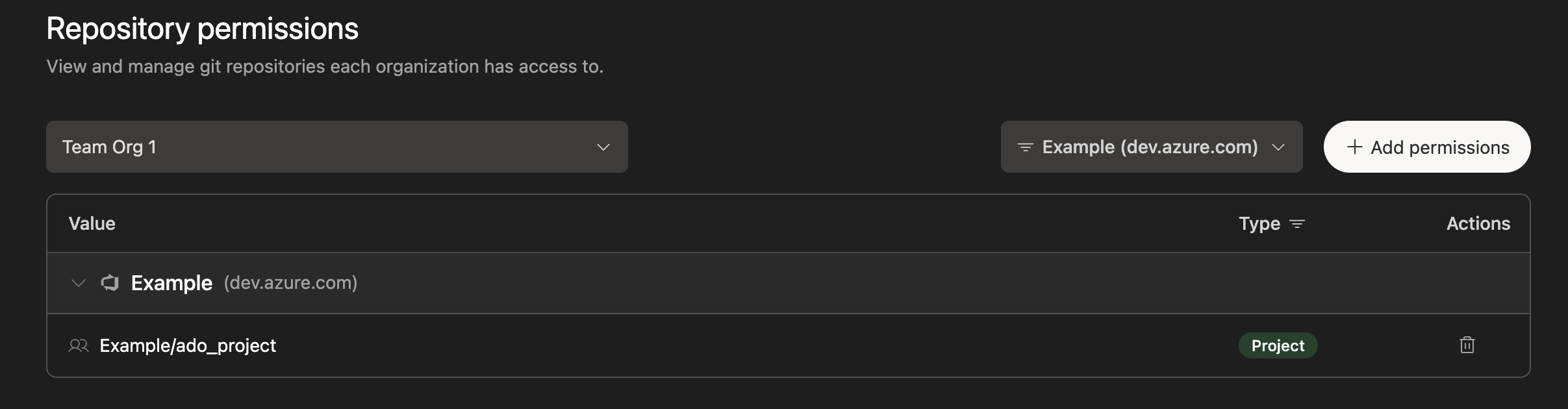
8. In Devin, select **Git Permissions** in your Azure DevOps integration, choose a Sub-Organization, and grant permissions either at the Group or Repository level.
5. You are redirected to Microsoft to grant Devin permission to your tenant. After approving, you are returned to the Azure DevOps integration page in Devin, which now shows an **Add organization with service principal** section.
* Approving creates a service principal in your Microsoft Entra tenant
* This step only requests `User.Read` — it does not grant access to repositories
6. In Azure DevOps, navigate to **Organization Settings > Users**:
* Click **Add Users** and add the service principal (`Cognition Azure DevOps Service Principal`)
* Select **Basic** for the Access level (Stakeholder is not sufficient — APIs require Basic)
* Add to all projects you want Devin to have access to
* Assign the service principal to the relevant Azure DevOps Groups (typically Project Contributors)
7. Back in Devin, in the **Add organization with service principal** section of the Azure DevOps integration page, enter the Azure DevOps organization name from the previous step and click **Add**.
8. In Devin, select **Git Permissions** in your Azure DevOps integration, choose a Sub-Organization, and grant permissions either at the Group or Repository level.
 9. For each Organization that has been granted permissions, navigate to **Devin's Settings > Devin's Machine**, click **+ Repository**, and integrate the repositories.
## What Devin Can Access
Devin's Azure DevOps integration is scoped to **Git operations only**:
| Capability | Description |
| -------------------- | ---------------------------------------------- |
| List repositories | View available repositories and their metadata |
| Read branches | Access branch information and commit history |
| Create pull requests | Open new PRs for code changes |
| View pull requests | Access PR events, comments, and status |
| Push code | Push new branches and commits to repositories |
Devin does **not** have access to work items, pipelines, builds, test plans, artifacts, wiki, or service connections.
If your organization requires Devin to support additional Azure DevOps areas in the future, please contact [enterprise@cognition.ai](mailto:enterprise@cognition.ai) to discuss your requirements.
## Security Considerations
* **Minimal Entra permissions** — Only `User.Read` is requested. No directory-wide read access, group membership visibility, or administrative control.
* **Explicit authorization** — Entra approval alone grants no Azure DevOps access. All repository access must be explicitly assigned by your Azure DevOps admin.
* **Encrypted credentials** — All tokens are encrypted and securely stored.
* **Scoped access** — Permissions can be limited to specific projects, repositories, and operations via Devin's Enterprise UI.
* **Auditability** — Activity is logged in Entra sign-in logs and Azure DevOps audit logs.
* **Branch policies respected** — Devin's PRs are subject to the same branch policies and review requirements as any other contributor.
## Best Practices
* **Use repository-level permissions** — Grant Devin access only to the specific repositories and projects it needs, rather than organization-wide access.
* **Enable branch policies** — Set up branch policies in Azure DevOps to ensure all changes go through proper review processes before being merged.
* **Monitor audit logs** — Regularly review Azure DevOps audit logs and Entra sign-in logs for the service principal's activity.
## Troubleshooting
**Admin consent fails:**
* Verify the approving user has permission to grant admin consent for applications in your Entra tenant
* If your tenant restricts application consent, a Global Administrator or Cloud Application Administrator may need to grant consent
**Service principal not visible in Azure DevOps:**
* Verify the admin consent completed successfully in your Entra portal under **Enterprise Applications** (look for `Cognition Azure DevOps Service Principal`)
* Ensure the service principal has been explicitly added to your Azure DevOps organization under **Organization Settings > Users**
**Conditional Access / MFA blocking access:**
* If the service principal is subject to Conditional Access policies enforcing MFA, token refresh will fail silently. Create a Conditional Access exclusion for the service principal against the Devin application.
**Devin cannot see my repositories:**
* Verify that the service principal has been added to the Azure DevOps organization under **Organization Settings > Users**
* Confirm the access level is set to **Basic** (Stakeholder is insufficient for API access)
* Check that repository permissions have been granted in Devin's Enterprise Settings
* Ensure the repositories have been added to Devin's Machine
**Pull request creation fails:**
* Confirm that the service principal has Contributor permissions on the target repository
* Check that branch policies are not blocking the PR creation
* Verify that the target branch exists and is accessible
## Network Setup
If you have IP filtering enabled on your Azure DevOps instance, you will need to allowlist Devin's IP addresses.
For the most up-to-date list, see our [IP allowlisting documentation](/admin/common-issues#ip-allowlisting).
9. For each Organization that has been granted permissions, navigate to **Devin's Settings > Devin's Machine**, click **+ Repository**, and integrate the repositories.
## What Devin Can Access
Devin's Azure DevOps integration is scoped to **Git operations only**:
| Capability | Description |
| -------------------- | ---------------------------------------------- |
| List repositories | View available repositories and their metadata |
| Read branches | Access branch information and commit history |
| Create pull requests | Open new PRs for code changes |
| View pull requests | Access PR events, comments, and status |
| Push code | Push new branches and commits to repositories |
Devin does **not** have access to work items, pipelines, builds, test plans, artifacts, wiki, or service connections.
If your organization requires Devin to support additional Azure DevOps areas in the future, please contact [enterprise@cognition.ai](mailto:enterprise@cognition.ai) to discuss your requirements.
## Security Considerations
* **Minimal Entra permissions** — Only `User.Read` is requested. No directory-wide read access, group membership visibility, or administrative control.
* **Explicit authorization** — Entra approval alone grants no Azure DevOps access. All repository access must be explicitly assigned by your Azure DevOps admin.
* **Encrypted credentials** — All tokens are encrypted and securely stored.
* **Scoped access** — Permissions can be limited to specific projects, repositories, and operations via Devin's Enterprise UI.
* **Auditability** — Activity is logged in Entra sign-in logs and Azure DevOps audit logs.
* **Branch policies respected** — Devin's PRs are subject to the same branch policies and review requirements as any other contributor.
## Best Practices
* **Use repository-level permissions** — Grant Devin access only to the specific repositories and projects it needs, rather than organization-wide access.
* **Enable branch policies** — Set up branch policies in Azure DevOps to ensure all changes go through proper review processes before being merged.
* **Monitor audit logs** — Regularly review Azure DevOps audit logs and Entra sign-in logs for the service principal's activity.
## Troubleshooting
**Admin consent fails:**
* Verify the approving user has permission to grant admin consent for applications in your Entra tenant
* If your tenant restricts application consent, a Global Administrator or Cloud Application Administrator may need to grant consent
**Service principal not visible in Azure DevOps:**
* Verify the admin consent completed successfully in your Entra portal under **Enterprise Applications** (look for `Cognition Azure DevOps Service Principal`)
* Ensure the service principal has been explicitly added to your Azure DevOps organization under **Organization Settings > Users**
**Conditional Access / MFA blocking access:**
* If the service principal is subject to Conditional Access policies enforcing MFA, token refresh will fail silently. Create a Conditional Access exclusion for the service principal against the Devin application.
**Devin cannot see my repositories:**
* Verify that the service principal has been added to the Azure DevOps organization under **Organization Settings > Users**
* Confirm the access level is set to **Basic** (Stakeholder is insufficient for API access)
* Check that repository permissions have been granted in Devin's Enterprise Settings
* Ensure the repositories have been added to Devin's Machine
**Pull request creation fails:**
* Confirm that the service principal has Contributor permissions on the target repository
* Check that branch policies are not blocking the PR creation
* Verify that the target branch exists and is accessible
## Network Setup
If you have IP filtering enabled on your Azure DevOps instance, you will need to allowlist Devin's IP addresses.
For the most up-to-date list, see our [IP allowlisting documentation](/admin/common-issues#ip-allowlisting).