> ## Documentation Index
> Fetch the complete documentation index at: https://docs.devinenterprise.com/llms.txt
> Use this file to discover all available pages before exploring further.
# Enterprise Deployment
> Learn about Devin's enterprise deployment options: Enterprise Cloud and Customer Dedicated Deployment architectures.
## Overview
Devin is designed for seamless integration into enterprise environments, with deployment options that balance **speed, security, and compliance**. Devin can be initiated through the **web interface, Slack, or API**, ensuring flexibility in how teams engage with the system.
Upon activation, Devin operates within a **dedicated workspace** that includes:
* **A shell** for executing commands.
* **A browser** for web-based interactions.
* **A code editor** for reading and writing code.
Devin's **workspace** operates under the control of its **brain**, which always resides within **Cognition's Cloud**.
## Devin's Architecture
Devin's architecture consists of two key components:
* **The Brain**: A stateless, cloud-based service that powers Devin's intelligence, always residing in Cognition's Cloud (similar to GitHub Copilot's architecture).
* **The Devbox**: A secure virtual environment where Devin executes code, connects to resources, and interacts with your systems.
The deployment model you choose determines where the Devbox runs and how it connects to your infrastructure.
### Enterprise Cloud Architecture
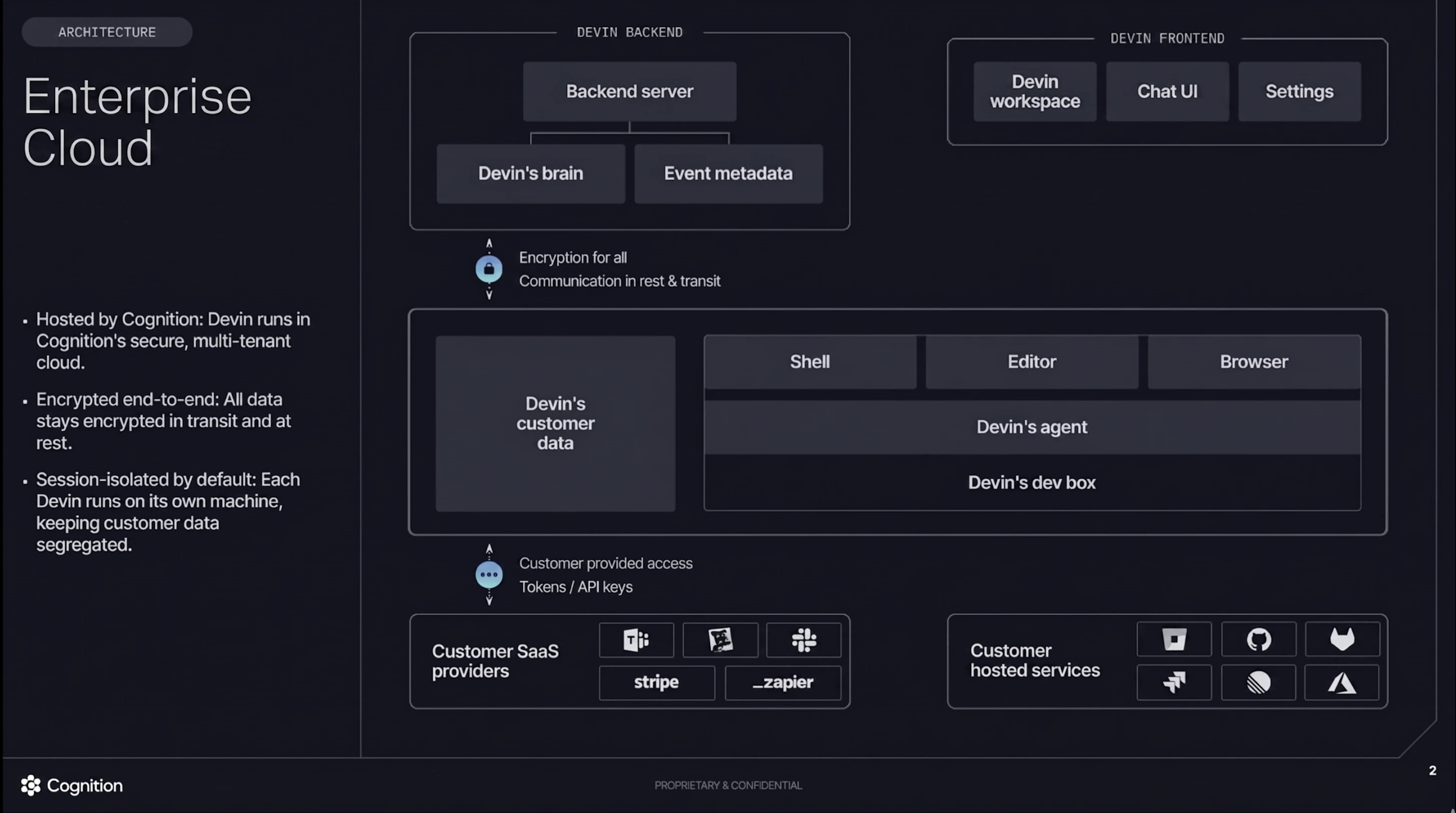 In the Enterprise Cloud model, both Devin's brain and Devbox run in Cognition's secure, multi-tenant cloud. All data stays encrypted in transit and at rest. Each Devin session runs on its own isolated machine, keeping customer data segregated by default.
### Customer Dedicated Deployment Architecture
In the Enterprise Cloud model, both Devin's brain and Devbox run in Cognition's secure, multi-tenant cloud. All data stays encrypted in transit and at rest. Each Devin session runs on its own isolated machine, keeping customer data segregated by default.
### Customer Dedicated Deployment Architecture
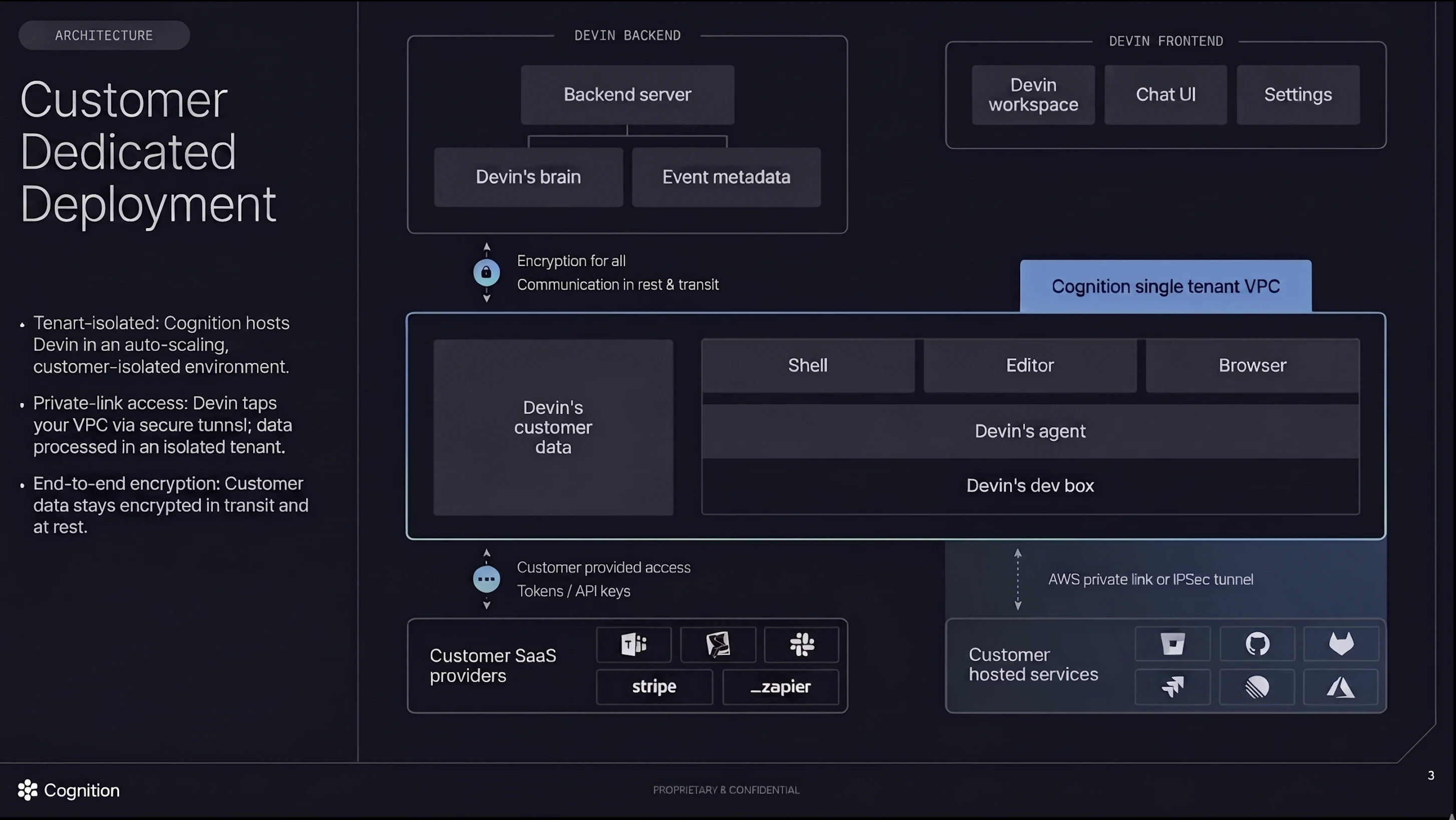 In the Customer Dedicated Deployment model, Cognition hosts Devin in an auto-scaling, customer-isolated environment within a single-tenant VPC. Your VPC connects via AWS Private Link (or IPSec tunnel), allowing Devin to securely access your privately networked resources. Customer data stays encrypted in transit and at rest, and is processed in an isolated tenant.
For detailed steps on configuring AWS PrivateLink connectivity, see [Dedicated Deployment Private Networking](/enterprise/deployment/dedicated_saas_private_networking).
## Deployment Options
Devin supports two primary deployment models to meet varying enterprise requirements:
| **Deployment Model** | **Brain Location** | **Devbox Location** | **Network Setup** | **Primary Advantage** | **Best For** |
| --------------------------------- | ------------------ | ------------------------------------ | -------------------------------- | -------------------------------------------- | ------------------------------------------------------- |
| **Enterprise Cloud** | Cognition Cloud | Cognition Cloud | Public / IP Whitelist | Fastest setup, managed infrastructure | Organizations with public or IP-whitelistable resources |
| **Customer Dedicated Deployment** | Cognition Cloud | Customer-dedicated single-tenant VPC | AWS Private Link or IPSec Tunnel | Tenant isolation with managed infrastructure | Strategic enterprises with private networks |
### Choosing a Deployment Model
**Enterprise Cloud Deployment** is recommended for most organizations looking for a **quick setup** with minimal operational overhead. Deployment can be completed within minutes. This model works well when your source code management (GitHub.com, GitLab.com, Azure DevOps Cloud) and artifact stores are publicly accessible or can support IP whitelisting.
**Customer Dedicated Deployment** is ideal for strategic enterprises whose resources are on private networks and cannot support IP whitelisting. In this model, Cognition hosts Devin in an auto-scaling, customer-isolated environment within a single-tenant VPC. Your VPC connects to Cognition's infrastructure via a secure AWS Private Link (or IPSec tunnel), allowing Devin to access your privately networked resources while maintaining tenant isolation. This deployment model supports MFA VPN access to your internal resources.
**Important Networking Considerations:**
* Devin's Devbox must be able to reach your source code management systems (GitHub, GitLab, Bitbucket, Azure DevOps), artifact stores (Artifactory, CodeArtifact), and other development tools.
* **MFA VPNs are not compatible** with Enterprise Cloud deployments. If your resources require MFA VPN access, consider Customer Dedicated Deployment.
* **OpenVPN is supported** with Customer Dedicated deployments, enabling secure connectivity to your internal resources through your existing VPN infrastructure.
* For self-hosted tools (GitHub Enterprise Server, GitLab self-hosted, Artifactory), you'll need either IP whitelisting (for Enterprise Cloud) or a dedicated deployment model.
* **End user workstations** must have connectivity to `*.devinapps.com` (HTTPS/443) to access Devin's interactive session tools such as the IDE and Desktop. If this domain is blocked by a corporate proxy or firewall, users will be unable to use these features. See [Customer Dedicated Deployment Requirements](#customer-dedicated-deployment-requirements) for details.
Once a deployment model is chosen, the next critical step is **integrating source code repositories**.
## Deployment Specifications
### Customer Dedicated Deployment Requirements
For Customer Dedicated deployments, Cognition manages the infrastructure on your behalf. Requirements include:
* **Network Connectivity**:
* AWS Private Link (preferred)
* IPSec tunnel (alternative option)
* Ability to establish secure tunnel between your VPC and Cognition's single-tenant VPC
* **Access Configuration**:
* DNS resolution for your internal resources
* Network routing configured to allow Devin's Devbox to reach your SCM, artifact stores, and other development tools
* **End User Workstation Connectivity**:
* End user workstations must be able to reach `*.devinapps.com` over HTTPS (port 443). This domain serves Devin's interactive session tools — including the IDE (VSCode frontend) and Desktop (browser viewer) — which are loaded in the user's browser via iframes.
* If your organization uses a corporate proxy or firewall, ensure `*.devinapps.com` is on the allowlist for user workstations.
### Cross-Tenant Communication
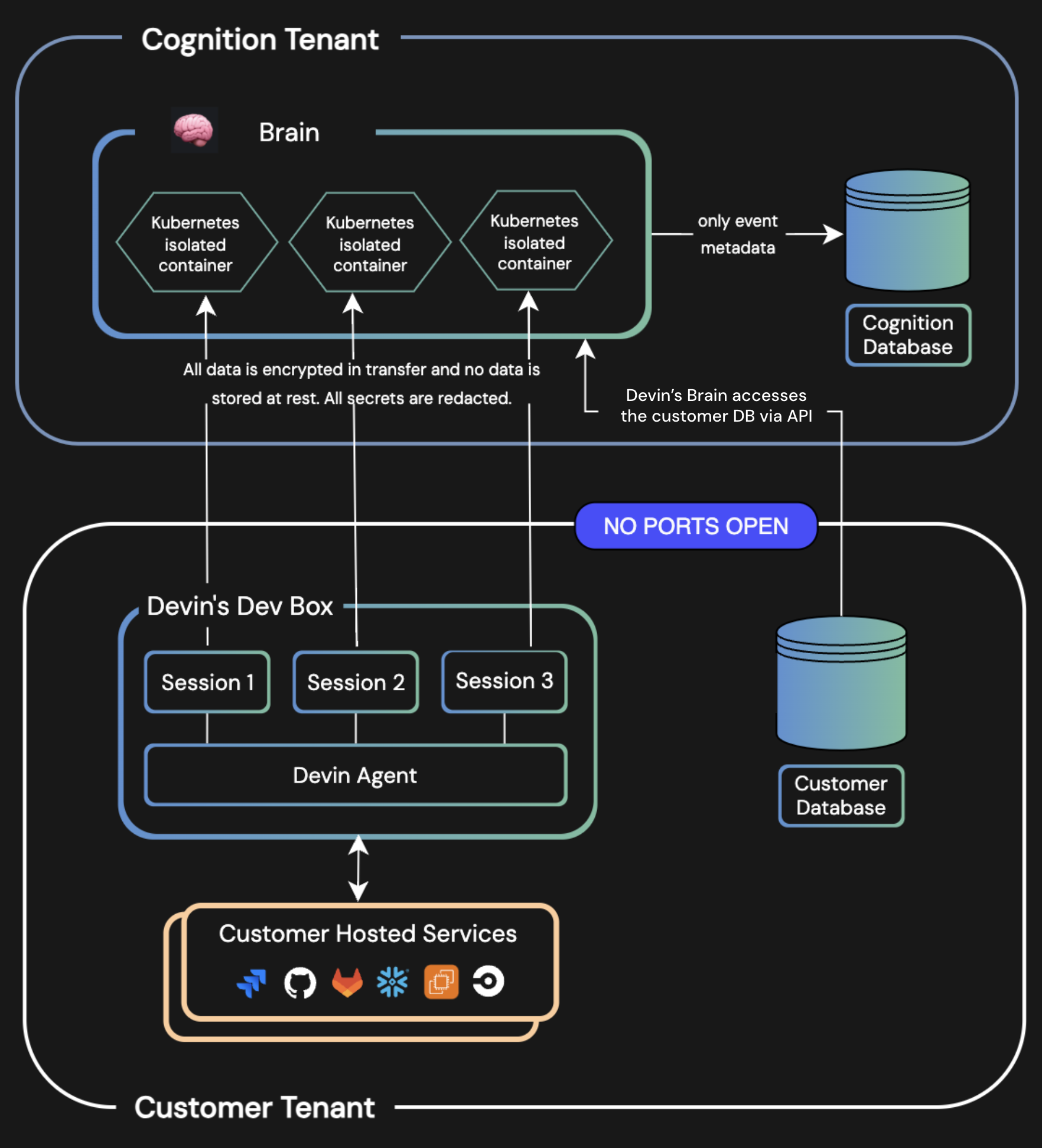
Devin's architecture ensures **secure communication** between your environment and Cognition's Cloud.
In the Customer Dedicated Deployment model, Cognition hosts Devin in an auto-scaling, customer-isolated environment within a single-tenant VPC. Your VPC connects via AWS Private Link (or IPSec tunnel), allowing Devin to securely access your privately networked resources. Customer data stays encrypted in transit and at rest, and is processed in an isolated tenant.
For detailed steps on configuring AWS PrivateLink connectivity, see [Dedicated Deployment Private Networking](/enterprise/deployment/dedicated_saas_private_networking).
## Deployment Options
Devin supports two primary deployment models to meet varying enterprise requirements:
| **Deployment Model** | **Brain Location** | **Devbox Location** | **Network Setup** | **Primary Advantage** | **Best For** |
| --------------------------------- | ------------------ | ------------------------------------ | -------------------------------- | -------------------------------------------- | ------------------------------------------------------- |
| **Enterprise Cloud** | Cognition Cloud | Cognition Cloud | Public / IP Whitelist | Fastest setup, managed infrastructure | Organizations with public or IP-whitelistable resources |
| **Customer Dedicated Deployment** | Cognition Cloud | Customer-dedicated single-tenant VPC | AWS Private Link or IPSec Tunnel | Tenant isolation with managed infrastructure | Strategic enterprises with private networks |
### Choosing a Deployment Model
**Enterprise Cloud Deployment** is recommended for most organizations looking for a **quick setup** with minimal operational overhead. Deployment can be completed within minutes. This model works well when your source code management (GitHub.com, GitLab.com, Azure DevOps Cloud) and artifact stores are publicly accessible or can support IP whitelisting.
**Customer Dedicated Deployment** is ideal for strategic enterprises whose resources are on private networks and cannot support IP whitelisting. In this model, Cognition hosts Devin in an auto-scaling, customer-isolated environment within a single-tenant VPC. Your VPC connects to Cognition's infrastructure via a secure AWS Private Link (or IPSec tunnel), allowing Devin to access your privately networked resources while maintaining tenant isolation. This deployment model supports MFA VPN access to your internal resources.
**Important Networking Considerations:**
* Devin's Devbox must be able to reach your source code management systems (GitHub, GitLab, Bitbucket, Azure DevOps), artifact stores (Artifactory, CodeArtifact), and other development tools.
* **MFA VPNs are not compatible** with Enterprise Cloud deployments. If your resources require MFA VPN access, consider Customer Dedicated Deployment.
* **OpenVPN is supported** with Customer Dedicated deployments, enabling secure connectivity to your internal resources through your existing VPN infrastructure.
* For self-hosted tools (GitHub Enterprise Server, GitLab self-hosted, Artifactory), you'll need either IP whitelisting (for Enterprise Cloud) or a dedicated deployment model.
* **End user workstations** must have connectivity to `*.devinapps.com` (HTTPS/443) to access Devin's interactive session tools such as the IDE and Desktop. If this domain is blocked by a corporate proxy or firewall, users will be unable to use these features. See [Customer Dedicated Deployment Requirements](#customer-dedicated-deployment-requirements) for details.
Once a deployment model is chosen, the next critical step is **integrating source code repositories**.
## Deployment Specifications
### Customer Dedicated Deployment Requirements
For Customer Dedicated deployments, Cognition manages the infrastructure on your behalf. Requirements include:
* **Network Connectivity**:
* AWS Private Link (preferred)
* IPSec tunnel (alternative option)
* Ability to establish secure tunnel between your VPC and Cognition's single-tenant VPC
* **Access Configuration**:
* DNS resolution for your internal resources
* Network routing configured to allow Devin's Devbox to reach your SCM, artifact stores, and other development tools
* **End User Workstation Connectivity**:
* End user workstations must be able to reach `*.devinapps.com` over HTTPS (port 443). This domain serves Devin's interactive session tools — including the IDE (VSCode frontend) and Desktop (browser viewer) — which are loaded in the user's browser via iframes.
* If your organization uses a corporate proxy or firewall, ensure `*.devinapps.com` is on the allowlist for user workstations.
### Cross-Tenant Communication
Devin's architecture ensures **secure communication** between your environment and Cognition's Cloud.
 | **Feature** | **Requirement** |
| ----------------- | ------------------------------------------------------------------------------------------------------------------ |
| **Networking** | Egress access required |
| **Ports** | HTTPS/443 |
| **Connection** | On startup, Devin establishes a **secure WebSocket** connection to an **isolated container** in Cognition's tenant |
| **Communication** | All subsequent operations occur over this **secure channel** |
| **Isolation** | Backend session isolation for enhanced security |
Granting **internet access** to Devin's workspace is **strongly recommended** to ensure full functionality. Devin needs to access your source code repositories, artifact stores, and other development tools.
## SSO Guides
Use the following guides to configure single sign-on (SSO) for your enterprise deployment.
Configure authentication using OpenID Connect with Okta.
Enable seamless authentication with Microsoft Entra ID.
Configure authentication using a generic SAML 2.0 identity provider.
Configure authentication using a generic OpenID Connect identity provider.
## FAQs & Additional Information
Devin is a **compound AI system** and does not currently support third-party LLM API keys.
Please contact our sales team for information on Google Cloud Platform support.
### Next Steps
* **For Enterprise Cloud Deployment**: Start using Devin immediately by [logging in to the web app](https://app.devin.ai).
* **For Customer Dedicated Deployment**: Contact our [Enterprise Sales Team](mailto:enterprise@cognition.ai) to discuss your networking requirements and begin the setup process.
* **Need Assistance?** Contact our [Enterprise Sales Team](mailto:enterprise@cognition.ai).
| **Feature** | **Requirement** |
| ----------------- | ------------------------------------------------------------------------------------------------------------------ |
| **Networking** | Egress access required |
| **Ports** | HTTPS/443 |
| **Connection** | On startup, Devin establishes a **secure WebSocket** connection to an **isolated container** in Cognition's tenant |
| **Communication** | All subsequent operations occur over this **secure channel** |
| **Isolation** | Backend session isolation for enhanced security |
Granting **internet access** to Devin's workspace is **strongly recommended** to ensure full functionality. Devin needs to access your source code repositories, artifact stores, and other development tools.
## SSO Guides
Use the following guides to configure single sign-on (SSO) for your enterprise deployment.
Configure authentication using OpenID Connect with Okta.
Enable seamless authentication with Microsoft Entra ID.
Configure authentication using a generic SAML 2.0 identity provider.
Configure authentication using a generic OpenID Connect identity provider.
## FAQs & Additional Information
Devin is a **compound AI system** and does not currently support third-party LLM API keys.
Please contact our sales team for information on Google Cloud Platform support.
### Next Steps
* **For Enterprise Cloud Deployment**: Start using Devin immediately by [logging in to the web app](https://app.devin.ai).
* **For Customer Dedicated Deployment**: Contact our [Enterprise Sales Team](mailto:enterprise@cognition.ai) to discuss your networking requirements and begin the setup process.
* **Need Assistance?** Contact our [Enterprise Sales Team](mailto:enterprise@cognition.ai).